Monday, 5 January 2015

How To Check Who Viewed Your Facebook Profile Without Any App

Hey Guys,
You Can Find Many tricks on internet that who viewed your fb profile but some of them not working and some of them Required your facebook profile info.So i am showing you a trick in which you wanna know who viewed your facebook profile without help of any apps...So make prank your friends that you know tricks of facebook and enjoy this easy trick for  Check Who Viewed Your Facebook Profile Without Any App......So Follow My easy guide for get the info about who viewed your facebook app in last few  days.

Requirements For This Trick

  • A Computer or Laptop
  • Chrome Of Mozilla FIrefox
 For Get Info About Who Viewed Your Facebook Profile follow This Easy Guide

  • At First Open Facebook.com And Open Your Timeline.... You Will Get a url Like This "facebook.com/xyz"
  • Now Right Click On Anywhere and Click on "View Page Sourse"
  • After That Press Ctrl+f And Search For This Code - “InitialChatFriendsList” (Without Quotes)
  • Now You Will Get Lots Of Numerical Numbers Like This "1000273989"
  • Now Copy Numerical Number And put Like This - Facebook.com/100273989
  • Now Wait for page Loading and it will Open profile Of that person who viewed your profile 
 This Trick Is Little Difficult but you can try and you will get success.....Enjoy This Trick And Keep Visit - Missingtricks.net

Hot Deal: 16Gb Pendrive+8Gb Memory Card Only @492 Rs.

Paytm Became Very Popular In Last Months....So Here Is a Great Deal for You to loot Paytm... Now Get 16Gb Pendrive+8Gb Memory Card Only @492 Rs...So Grab The Deal Before It Stock Out...

Product Name - Sandisk Cruzer Blade 16GB Pen Drive + SanDisk Mobile Ultra 8 GB

Product Images

 Price Information - 

Original Price - 792
Offer Price - 492 (300Rs Cashback)

For Purchase This Product Follow Easy Steps - 

Promocode - COMBO300
     
    • Make Payment
    • Cashback Will Be Credited In Your A/c Once Order Will Ship
    Enjoy This Combo Offer And Stay Tuned For More Tricks -Missingtricks,net

    Sunday, 4 January 2015

    Jabong Promocodes Currently Working

    Hy Guys,
    I Am Presenting You Jabong Promocodes Currently working for January 2015


    So Start Shop At This January with Jabong Promocodes And Save more...

    Open Jabong Offer Page Site From here - Jabong.com

    300Off On Minimum Purchase of 999


    Promocode - SHOP300
    Valid Till 31-Jan-2015


    500Off On Minimum Purchase Of 1699

    Promocode - SHOP500
    Valid Till 31-Jan-2015

    750Off On Minimum Purchase Of 2499

    Promocode - SHOP750
    Valid Till 31-jan-2015

    1000Off On Minimum Purchase Off 3350

    Promocode - SHOP1000
    Valid Till 31-Jan-2015

    Enjoy Shopping And Keep Visit Missingtricks.net

    Saturday, 3 January 2015

    Amazon Happy Hours Deal Today At 7PM

    Hy Guys,
    Amazon Happy Hours Deals Today At 7PM For 3Rd January......Get Amazing Deals During 7P.m From Amazon.. Get Hot Deals From Amazon At 7p.m at lowest prices... 

    So Be Ready At 7P.m. For purchase products at lowest prices... Get Offer Link From Below....

    Amazon Happy Hours Deal
    Amazon Happy Hours Deal

    Offer Details

    • Offer Valid From 7-8 p.m
    • Refresh Page After Every 5 Minutes
    • Add Product In Cart
    • Complete Payment

    Offer Page - http://bit.ly/13OzkYL

    Stay Tuned For Latest Offer And Deals - Missingtricks.net

    Friday, 2 January 2015

    Unlimited Free Recharge Trick January 2015

    Hy Guys....
    Missingtricks is back with this awesome offer for get unlimited free recharge coupons from vee app.... last time most people was earned more than 500Rs from this offer.... now this trick is back again for get unlimited free recharge coupons...... Just follow these steps for get Unlimited Free Recharge from Vee App..........


    Unlimited Free Recharge Trick January 2015
    Unlimited Free Recharge Trick January 2015

    How to Get Unlimited Freecharge Coupons

    Follow These Simple Steps for Get Unlimited free recharge coupons.......

    • At The first you need to install vee app from here - Click Me (Direct Link)
    • Now Install vee App that you downloaded from step first.....
    • After Install This App Open it and login with facebook id After Login With Facebook
    • Click On Upper Left Corner And Click On Refer And Earn
    • After Click On Refer And Earn You WIll Get 3 Options - 'Share', 'Earn' and 'Redeem'
    Now Click On Earn Tab Enter This Code For Get 10Rs In Your Vee Account

    Code -  wznszlo
     After Enter Code You Will Get 10Rs And Earn 20Rs Per Refer too.......

    So Start Refer Your Friends And Enjoy Unlimited Free Recharge Trick

    Terms -
    I)This Offer Is Valid Till 2Jan, 2015

    Stay Tuned For More Tricks - www.missingtricks.net

    How To Post In All Facebook Groups In One Click

    Hy Guys,
    Now Missingtricks is back for the new trick to Post In All Facebook Groups In One Time.....it Will Save your time and data .... and you can post in easiest way..... For get trick for  Post In All Facebook Groups In One Click Follow This Procedure .....


    Features Of This Trick - 

    I)Time Saving
    II)Data Saving
    III)Faster Way
    IV)No Risk Of Ban
    V)Based On Latest Script

    Just Follow This Procedure for Post In All Facebook Groups In One Click -


    I) First Of All Download Script From Here -
    Click Me

    II) Now Goto  www.facebook.com and login with your Facebook Id

    III) Now Open Downloaded Script And Copy All Text With CTRL+A and CTRL+C

    IV) Now Goto Facebok Homepage and Press -

    Is Using Mozilla-
     Press -  CRTL+SHIFT+K And In Console panel Paste All Script

    If Using Chrome -
     Press -  F12 And In Console panel Paste All Script

    And Press Enter And You will get a popup like screenshot below......

    How To Post In All Facebook Groups In One Click
    How To Post In All Facebook Groups In One Click


    V) Now Enter All Your message which You want to Post And Click On Post and wait for a minute
     And you're Done....

    Enjoy Most Easy and fastest way for posting in all fb groups....

    Keep Visit -www.Missingtricks.net

    Thursday, 1 January 2015

    Change Facebook Profile Name Before 60 Days

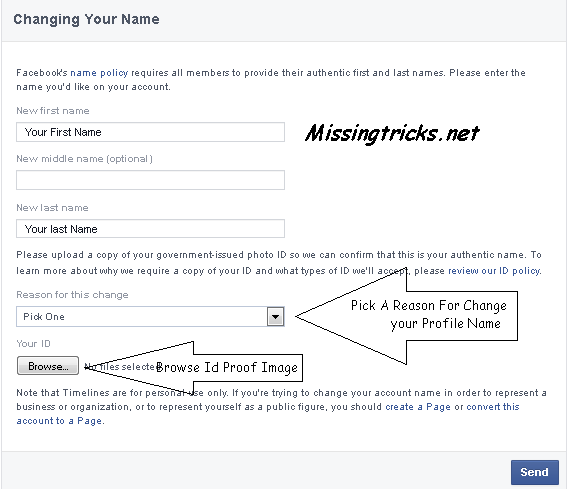
    Hy Guys.... Now I am Providing you a awesome trick for Change Facebook Profile Name Before 60 Days ...Facebook Is allow one user to change username after 60days... but with this trick you can change your Facebook Profile Name Before 60 Days....

    Change Facebook Profile Name Before 60 Days
    Change Facebook Profile Name Before 60 Days


    For Change Facebook Profile Name Before 60 Days Follow These Steps -

    1) Login In www.facebook.com

    2) Go Here - https://www.facebook.com/help/contact/?id=245617802141709

    Change Facebook Profile Name Before 60 Days
    Change Facebook Profile Name Before 60 Days


    3) Now Fill This Forum And CLick On Submit

    4)After Submit This Forum Your Name Will be change In 24 Hours.

    Keep Visit For Latest Tricks - www.Missingtricks.net