Transfer of Paytm Wallet Balance to Other Paytm Account
Today we will guide you how to transfer/send Paytm wallet money/balance from one account to another by an Android app.we can transfer paytm cash to another paytm account. If i want then i can tranfer my cash wallet balance to my friend's paytm wallet. Paytm is the most popular online shopping, recharges site. paytm offers are very popular in these days so we are sharing paytm method to transfer paytm wallet money to another paytm account. Paytm money can be transferred from one Paytm Wallet Account to other Paytm Wallet at minimum amount of 50rs.Transfer Paytm Wallet balance to another account is very important and good feature of Paytm but recently paytm set a new limit that you must transfer minimum 50rs and your paytm account must be 30 days old to transfer paytm money to another account. so Transfer Paytm Wallet balance to another account official way is here. here is the easy way to transfer of paytm wallet balance to other paytm account
Features of Paytm wallet Transfer app
- No Limit for balance transfer
- Cool and Faster app
- Transfer Paytm Wallet Balance To Another Account
- Instant Balance Transfer
Some Requirements for transfer paytm wallet money to another/friend's account
- Android Mobile
- Minimum Balance Transfer amount is Rs50
- Your Paytm Id Must be Minimum 30 Days Old
- Paytm Wallet App - Download
- Time
How To Transfer/send Paytm wallet/money From One Account to Another by an Android app
- At the first you need to install Paytm wallet App
- Download Paytm wallet app from here - Click Me
- After Install Paytm Wallet app now open paytm wallet app and enter your Email/Number and Passowrd

- After Login Into The app Now Click On "Pay a Friend"

- After Clicking on "Pay a Friend" then enter your friend's paytm registered number or email in which you want to transfer your paytm wallet money.
- After Enter your friend's number or email enter your desired amount which you want to transfer.
- And Click On Pay
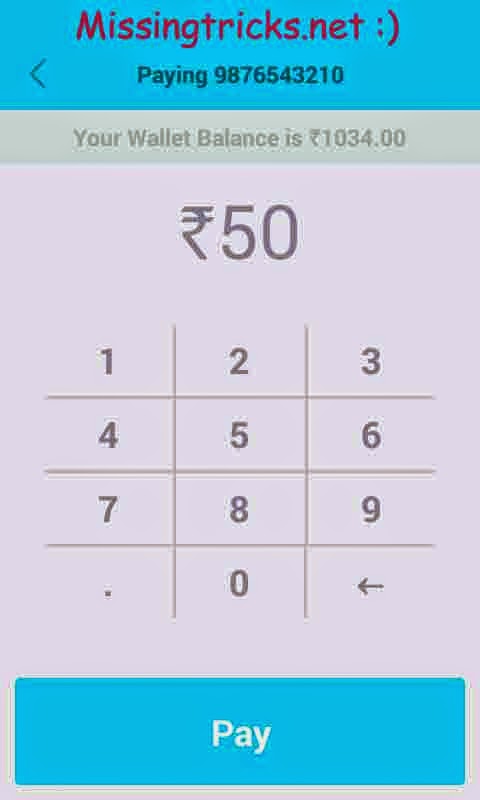
- And you are done. your paytm money/balance is now transferred to your friend's paytm wallet money